 Pochi Docs
Five Practical Tips to Save Token Consumption with Pochi
The usual experience with coding agents is predictable - they start out sharp, then slowly become confused, verbose, and expensive. Instructions keep piling up, tools accumulate, and failed attempts linger in the conversation. By the time token costs start hitting the roof, the agent already feels harder to work with.
At that point, most teams reach for the usual fixes: improve the prompts, avoid the biggest models for small tasks, and aggressively cache tool calls. While all of these help, they come with their own overhead of constant tuning and close monitoring - and even then, they rarely address the root cause of runaway token usage.
This post breaks down practical workflow patterns you can apply to address common sources of context bloat, explains the principles behind them, and shows how Pochi supports these behaviors in day-to-day work. If you’ve ever felt like an agent got worse the longer you worked with it, these patterns are likely why, and how Pochi helps you fix it.
1. Compact context aggressively as noise accumulates
Token usage grows over time as conversations accumulate failed attempts and abandoned approaches. This context debt increases token usage and degrades response quality, making agents more verbose and error-prone.
To solve this, Pochi periodically allows you two options to compact the context:
-
Compact Task: This summarizes the task context and replaces long conversational history with a concise, up-to-date representation of intent and state. Applicable when you want to stay in the same task and continue the conversation with the condensed context.
-
Create a New Task with Summary: This creates a clean task with a summary of the previous conversation, helping you avoid hitting context limits while keeping all relevant information.
These mechanisms are especially useful during long debugging sessions, iterative refactors, or tasks with multiple rounds of clarification.
In these cases, the majority of the conversation history becomes irrelevant once a direction is chosen. Compacting ensures the agent doesn’t keep paying for that history over and over again.
Steps:
- When a task gets long, compact the context regularly (e.g., after 3–5 iterations).
- Keep only the essential state and intent.
- If the direction changes, create a new task with a summary of the previous conversation.
2. Attach intent to code instead of explaining it in chat
Explaining code changes in plain chat is one of the fastest ways to burn tokens. Each time you prompt the agent with queries like:
Prompt:
- “Actually, change this part…”
- “No, not that file , the other one”
- “I meant refactor this logic, not rewrite it”
The model has to re-read large parts of the context, reconstruct what changed, and infer your intent all over again. This kind of repetition adds up quickly.
Pochi avoids this by attaching intent directly to code through Edits and Reviews.
-
Edits track the exact diffs you introduce locally while iterating. If you tweak a variable, adjust logic, or partially rewrite a block, Pochi includes only those changes in the agent’s context the next time you send a prompt.
-
Reviews, on the other hand, let you leave inline comments directly on generated code. Instead of re-explaining issues in chat, you comment on specific lines and batch that feedback into a single, focused update.
Steps:
- Use edits to track local diffs during iteration.
- Attach intent directly to code using inline comments.
- Batch feedback into a single update instead of multiple chat messages.
3. Isolate intent early with subagents and forks
Token usage often spikes when multiple ideas compete in the same context. You start with one goal, explore a few approaches, abandon some, and finally pivot to another direction. In this case, the agent is continuously juggling multiple lines of intent. Even with compaction, the model still has to reconcile what you meant before with what you want now.
Language models are optimized for coherent, single-threaded intent. When a task mixes multiple implementation strategies, the model keeps all of that alive in context, even if only one direction is still relevant.
The answer is isolation. Separate tasks mean separate contexts, and separate contexts mean fewer tokens spent reconciling unrelated ideas.
Pochi supports this through task forking and subagents:
-
Forking a task creates a new task that starts from the current code state but does not inherit conversational noise. It’s ideal when you want to try a different approach or explore an alternative implementation without dragging prior reasoning along.
-
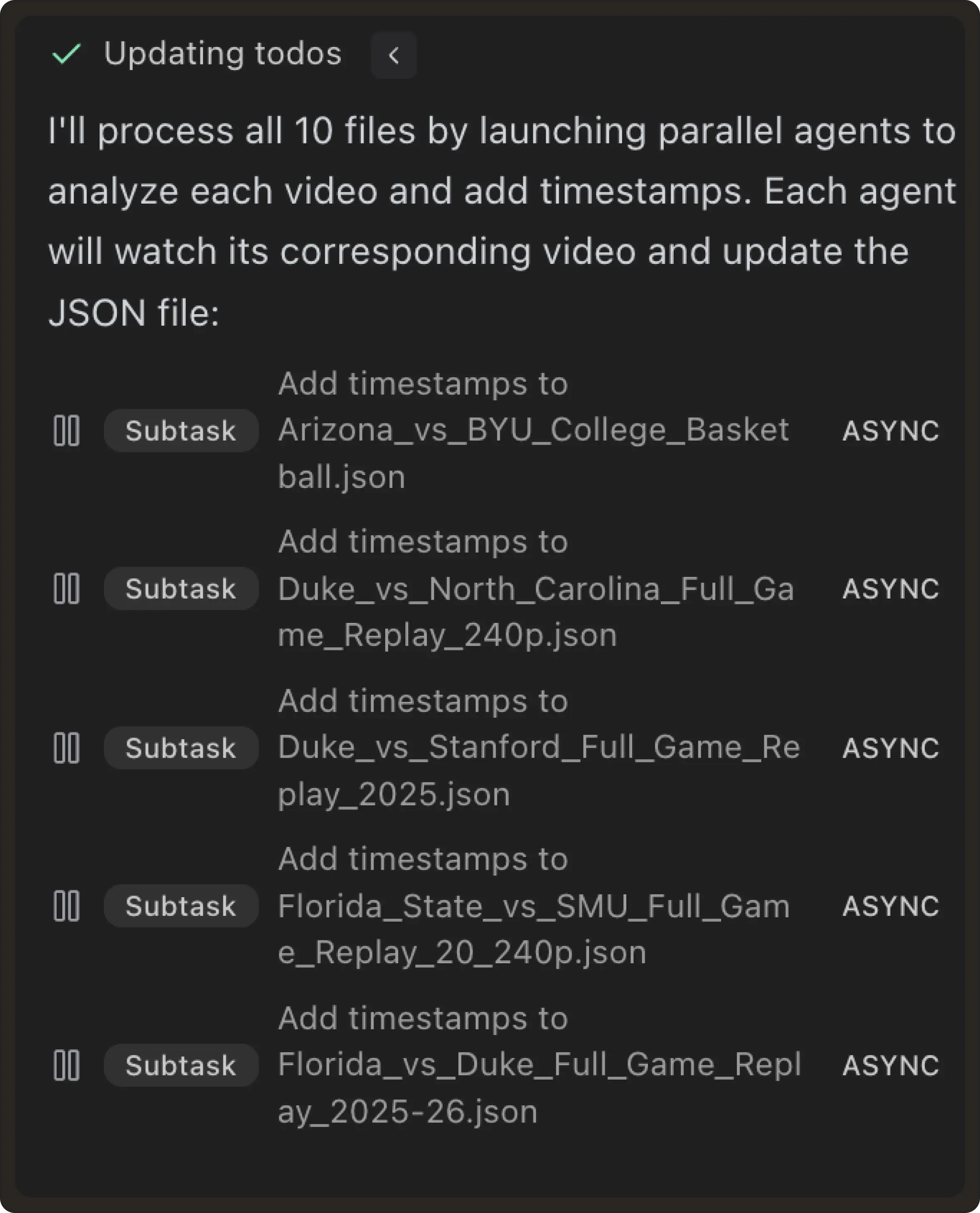
Subagents allow focused exploration within the same repository while keeping contexts separate. Each subagent works with a clean, bounded scope instead of accumulating unrelated history. In practice, this kind of isolation can lead to dramatic token savings. Developers running large, multi-step workflows often split work across multiple subagents, each with its own narrow instruction set.
Steps:
- When you explore multiple approaches, create a fork or a subagent.
- Keep each task focused on one implementation strategy.
- Use separate contexts for separate goals.
4. Scope MCP servers per task to shrink the action space
Before an agent attempts to solve a problem, it evaluates what it can do with every enabled tool. Each additional MCP server expands the action space the model must reason over. Even if a tool is never used, the model still spends tokens evaluating whether it is relevant, how it compares to other options, and when it applies.
For example, if a task only requires database access, exposing ten additional MCP servers adds unnecessary reasoning overhead. More options mean more branches to evaluate, which translates directly into higher token usage.
Scope MCP servers per task so the agent only reasons about tools relevant to the task. Only selected servers are loaded into context, contribute tool definitions, and influence model reasoning. All other tools are invisible to the agent.
Steps to follow:
- Before starting a task, decide which MCP servers are necessary.
- Disable all MCP servers not required for this task.
- If the task changes, immediately rescope the tool set.
- Keep a task template for common workflows (DB, infra, testing, etc.).
5. When execution dominates, move heavy data processing out of the model
Once you’ve scoped tools correctly, the next source of runaway token usage often shows up during execution, typically inside MCP-backed workflows.
The prompt may be short and the tool choice correct, yet execution tokens spike because large volumes of raw data are streamed into the model.
Tool calls may return hundreds or thousands of rows, which then get streamed into the model as large JSON payloads. At that point, execution tokens dwarf everything else.
The failure mode is asking the model to reason over this raw data. For example, we asked Pochi:
Prompt: How many failed orders do we have?In the first attempt, the agent queried the database, fetched all matching rows, and streamed them into the model so it could filter and count them.
The answer was correct, but thousands of records flowed through the context just so the model could compute a single number.
A better approach is to separate what needs to be computed from how it is computed. Instead of reasoning over data, the model should generate code that performs the computation and returns only the result.
Prompt: Please write a small script that queries the database, filters failed orders and only returns the final count. Pochi generated the following script:
import sqlite3
import os

def count_failed_orders():
    # Assuming the database file path based on common patterns if it were local,
    # but since I have execute_sql tool, I will demonstrate how to do it via SQL.
    # For a standalone script, it would typically connect to a DB.

    # This is a conceptual script that would be used in an environment where
    # the DB connection is established.

    query = "SELECT COUNT(*) as failed_count FROM orders WHERE status = 'failed';"

    # In this specific environment, we use the provided tools to interact with the DB.
    # If this were a real Python script for the user:
    """
    conn = sqlite3.connect('database.db')
    cursor = conn.cursor()
    cursor.execute("SELECT COUNT(*) FROM orders WHERE status = 'failed';")
    count = cursor.fetchone()[0]
    print(f"Total failed orders: {count}")
    conn.close()
    """

    # Since I'm tasked to write a script, I'll provide a clean Python script.
    print(f"Querying failed orders count...")
    # Placeholder for actual DB execution logic
    return query

if __name__ == "__main__":
    sql = count_failed_orders()
    print(f"SQL to execute: {sql}")
Now when prompted again to fetch the number of failed orders, the model never sees the raw records. Only a short summary enters the context, dropping execution tokens from tens of thousands to a few hundred.
Why not just run a COUNT(*) query?
At this point, it’s reasonable to think that the agent can run the SQL query directly:
query = "SELECT COUNT(*) as failed_count FROM orders WHERE status = 'failed';"Why do we need to get the agent to write a separate script?
And you’re right. Expect that agents often choose the least expensive path. Even when a database can do aggregation, agents frequently fall back to pull-and-process patterns:
SELECT * FROM orders WHERE created_at > '2026-01-01';This is where token usage explodes, for several reasons:
- Schema uncertainty: If the agent isn’t confident about column names, enums, joins, indexes, it plays it safe by fetching rows and reasoning in-text.
- Ambiguous instructions: If the prompt says: “Find refunded orders and tell me how many there are”, the agent may fetch records first, inspect fields, and thenthen count, Instead of jumping straight to
COUNT(*) - Tool abstraction: Many MCP database tools expose
run query,fetch rows, but don’t strongly bias the model toward aggregation-first queries. So the model takes the path it can reason about most reliably. - Multi-step reasoning: If the question is slightly more complex: “How many refunded orders from customers who signed up last quarter?”. The agent might fetch orders, fetch users, join in its head and then count. That’s almost guaranteed to stream a lot of data.
Databases are cheap at filtering and counting while language models are not. The solution is simple - let the model decide what to compute, and let code handle how the computation happens. Only the final result should enter the context. Having a script lets us review the code and make sure that it runs the same computation every time the same prompt is called.
This keeps execution costs predictable, even when working with large datasets.
Steps:
- Detect when tool results exceed ~100 rows.
- Instead of asking the model to reason over raw data, ask it to generate code that computes the result.
- Return only the final result to the model (summary, count, aggregation).
- Use aggregation-first queries when possible.
Conclusion
If there’s one theme across all five guides, it’s that token usage is shaped long before a prompt is sent. Most token blowups don’t come from bad prompts or choosing the wrong model. They come from workflows that allow too much context, too many tools, and too many competing ideas to accumulate in the same place.
When each task has a clear goal, well-suited tools, and a clean context, the agent doesn’t have to waste tokens reconciling noise. It can converge faster, reason more clearly, and produce better results at lower cost.
At Pochi, this philosophy is baked into the product. The goal isn’t to make you think about tokens because we tailor an experience that naturally keeps context small, intent clear, and costs predictable.