 Pochi Docs
Weekly Update #28
TL;DR
This release ships a dedicated agent for product questions and a set of improvements that make iterative coding workflows noticeably tighter: smarter file handling, scoped terminal access for agents and faster codebase exploration.
Less context burns, fewer surprises.
More below!
🚀 Features
-
Product Guide Agent: Pochi now has a dedicated
guideagent built for product questions — ask "what can Pochi do?" or "set up a new GLM vendor" and it fetches live docs from docs.getpochi.com and answers directly in context.Before this, product questions went to the main agent, which would burn context pulling from external docs or redirect you entirely. The guide agent handles documentation and configuration questions in one place, keeping your main agent focused on the actual task.
Works for anything in the Pochi docs — features, config, vendor setup. No extra setup needed. #1449
✨ Enhancements
-
Web-Search Domain Filter: You can now restrict agent web-search to specific domains using an allowlist (
searchDomainFilter: ['github.com']) or denylist (['-reddit.com']). Pochi enforces filtering at the API level, not as a soft instruction to the model.Without this, agents could pull from any source during search. For teams in compliance-sensitive environments, that was a gap with no workaround.
Available to all logged-in Pochi users. Supports up to 20 domains; allowlist and denylist modes cannot be mixed. #1457
-
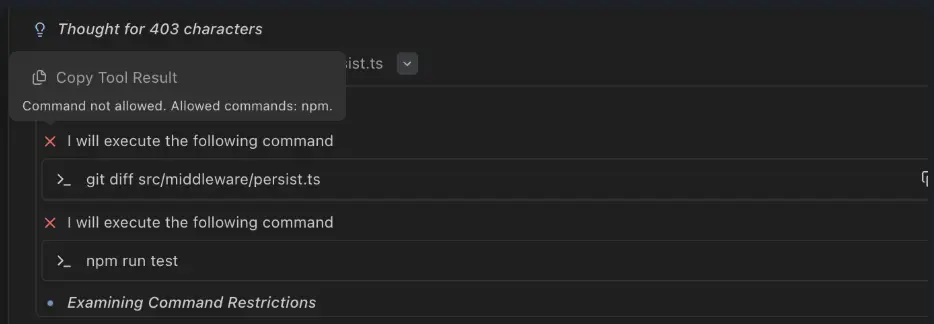
Command Whitelist for Agents: Custom agents can now be restricted to a specific set of commands using syntax like
executeCommand(npm)orexecuteCommand(npm *). Pochi rejects attempts outside the whitelist.Previously, deploying custom agents granted full terminal access. There was no way to scope what it could run.
Teams can now deploy agents in restricted environments without worrying about what they'll touch. #1445
-
Explore Agent Parallelization: The Explore agent now runs searches, reads, and greps simultaneously rather than sequentially.
On large codebases or monorepos, exploration used to mean a long chain of sequential round trips — every grep waiting on the last one. That latency stacks up fast.
Nothing to configure. It just runs faster. #1452
-
Large Tool Output Handling: Tool results over 50KB now save to a temporary file. The agent receives a preview (~2000 characters) and the file path, with full content available on demand.
Build logs, search results, verbose command output — these used to land directly in the context window, eating tokens and degrading response quality on long sessions.
This keeps workflows responsive even when commands produce verbose output. #1447
-
readFile LRU Cache: If you read a file and it hasn't changed, the next read returns a stub: "File unchanged since last read." The full content isn't re-fetched.
In iterative workflows (edit, verify, edit again) the same files get read repeatedly. Each pass used to cost tokens even when nothing had changed.
Token overhead drops on large codebases. Cache clears on compact and skips virtual and media files. #1441
-
Edit Safety for Unread Files: Pochi now blocks writes to files that haven't been read first. Try to edit or overwrite a file the agent hasn't seen, and it throws an explicit error.
The failure mode it prevents: an agent overwrites a file based on stale assumptions — no warning, no recovery. In iterative workflows, that's a hard-to-debug loss. #1441