 Pochi Docs
 _________
| 🧧 |
| 春节快乐 |
|_________|
// Spring Festival ReleaseWeekly Update #23
TL;DR
With Spring Festival marking a new beginning, we’re shipping a release that adds real momentum.
You can now generate structured walkthroughs for completed tasks, run browser-powered agents directly from the CLI, and review changes with a much richer diff experience. We’ve also made browser sessions more predictable and easier to reason about.
Let’s dive right in! 🏮
🚀 Features
-
Theme-aware Pochi sidebar icon: We’ve added a new Pochi logo to the VS Code activity bar and made it properly theme-aware.
This sounds simple, but VS Code renders activity bar SVGs as masked (binary) icons. That means the icon isn’t rendered as a full-color SVG - it’s treated as purely opaque vs transparent. This makes theme support tricky because an icon that looks correct in dark mode can break visually in light mode (and vice versa).
This meant one SVG couldn’t handle both cases cleanly. Instead of fighting the masking system, we leaned into it. We introduced two separate SVG variants and registered two activity bar containers, each with a when clause tied to
pochi.isDarkThemeandpochi.themeContextReady. Only one is visible at a time, and it switches reactively when the user changes themes.Under the hood, this also meant adding theme context management and updating our test utilities to account for the new sidebar view types. #1274
-
Create Walkthrough action for completed tasks: You can now generate a structured walkthrough summary for any completed task directly from the VS Code WebUI.
The new Walkthrough action produces a concise Markdown document saved to
./pochi/walkthroughs/$taskId.md. It summarizes the changes made during the task and helps you quickly understand the current state of the codebase without rereading the entire conversation.This is especially useful after larger refactors or multi-step tasks, where the final state matters more than the back-and-forth that led there. The walkthrough is designed to serve as lightweight documentation you can keep, review, or share. #818
-
Browser agent support in CLI: The Pochi CLI can now run browser-powered tasks. Previously, browser sessions were managed inside the VS Code extension only. That meant any task requiring a live browser - navigating websites, extracting content, interacting with pages, etc wasn’t supported in the CLI.
Now, the CLI now injects browser session environments just like VS Code does, and properly handles session lifecycle (creation, reuse, disposal).
This brings feature parity between VS Code and CLI for browser-backed tasks, and lays the groundwork for more consistent multi-environment agent behavior going forward. #1269
✨ Enhancements
-
Improved Browser Session Lifecycle and Debugging (VS Code): Browser sessions in the VS Code WebUI are now more predictable and easier to reason about.
You can manually control browser recording when using the browser agent, making it easier to inspect navigation steps and debug unexpected behavior. Recording is no longer purely implicit — you have clearer visibility into what the agent is doing.
At the same time, browser sessions are now properly scoped to their parent task. When a task tab is closed, all associated browser sessions are automatically cleaned up. This prevents orphaned sessions from lingering in the background and ensures browser lifecycle matches task lifecycle.
Together, these changes make browser-backed workflows more stable, easier to debug, and less prone to subtle resource leaks. #1275, #1282
-
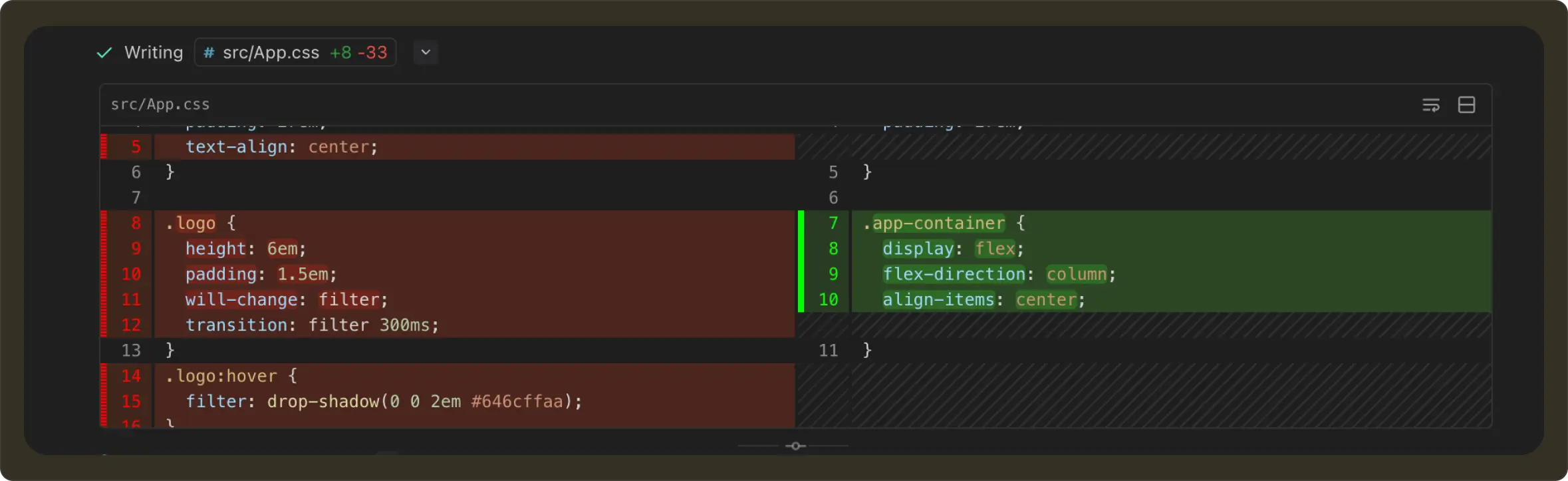
Rich diff viewer with unified/split toggle: Diffs in Pochi are now rendered using a dedicated
DiffViewercomponent, providing a clearer and more reliable visualization of code changes.You can switch between unified and split views and toggle line wrapping for better readability. Patches are now validated before rendering to prevent broken or partially trimmed diffs from being misinterpreted. If a patch is invalid, the UI safely falls back to a plain code block. #1279
📖 Resources
-
Five Practical Tips to Save Token Consumption with Pochi: A deep dive into workflow patterns that reduce context bloat, isolate intent, and prevent runaway execution costs. The post covers task compaction, forks and subagents, scoped MCP servers, and strategies for keeping large tool outputs out of the model’s context.
If you’ve ever noticed agents getting slower, more verbose, and more expensive over time, this guide explains why and how Pochi is designed to prevent it. Read the full post.
🔥 Preview
-
Code Review Subagents: We’re working on a new createReview tool that will spawn a dedicated subagent specialized in reviewing code within your repository.
Unlike general-purpose task agents, this review agent will operate with a focused review intent and structured output, making it easier to run targeted code reviews without polluting your main task context.
This tool will not be enabled by default and will be triggered explicitly, allowing teams to opt into review workflows when needed.